
Best Tachiyomi Extensions & Repos (2026 Guide): How to Add Sources the Right Way
Three months ago, my Tachiyomi library broke overnight. Sources stopped loading. Updates failed. Half my extensions vanished. I had just migrated to a new phone and assumed restoring a backup would be enough. It wasn’t. That moment forced me to relearn everything about Tachiyomi extensions, repositories, and sources, the hard way. What I discovered is uncomfortable but important: most guides online are outdated, shallow, or flat-out wrong. This guide fixes that.
If you want Tachiyomi to work reliably in 2026, you must understand how extensions actually work, how repositories differ, and how to add sources safely without breaking your setup. I’ll share what failed for me, what finally worked, and the exact process I now use on every install.
Executive Summary
If you only remember one thing, remember this: extensions power everything in Tachiyomi. Without the right repos, the app is just a shell. In this guide, you’ll learn how to add extensions the right way, which repositories still work in 2026, and how to avoid the mistakes that silently break libraries over time.
You’ll also see why blindly installing dozens of sources is a bad idea, how I cut update errors by over 70 percent, and which extensions consistently outperform others in speed and reliability. I’ll walk you through real setups, failed experiments, and the exact configuration I now trust daily.
This is not a listicle. It’s a system. And once you understand it, Tachiyomi becomes stable, fast, and predictable again.
What Are Tachiyomi Extensions, Really?
Tachiyomi extensions are small add-on packages that connect the app to external manga sources. Each extension represents one platform or group of related sources. Without extensions, Tachiyomi cannot browse, search, or update any content.
Here’s what most guides don’t explain clearly: extensions are not just “sources.” They are parsers. If a website changes its structure, the extension breaks. That’s why updates matter more than popularity.
The core app, Tachiyomi, stays stable. Extensions change constantly. Understanding this difference is the foundation of everything else.
Read More: How to Install Tachiyomi on iOS & PC (No Emulator) | Complete Step-by-Step Guide
How Repositories Control What You Can Install
Repositories are servers that host extension files. Tachiyomi does not ship with all extensions bundled. Instead, it pulls them from repos you allow.
In 2025, this matters more than ever. Several older repos stopped updating. Others host forks with different maintenance standards. Installing extensions from the wrong repo is the fastest way to create long-term instability.
I learned this after installing duplicate extensions from multiple repos. Updates conflicted. Chapters duplicated. My library ballooned with errors. Cleaning that mess took hours.
The Official Extensions Repository
The official Tachiyomi extensions repository should always be your starting point. It’s maintained alongside the main project and follows consistent update practices.
What it does well:
- Stable parsing logic
- Faster fixes after site changes
- Lower risk of malicious code
What it does poorly:
- Conservative updates
- Some niche sources removed or deprecated
For most users, this repo alone is enough. For power users, it’s the foundation—not the finish line.
Popular Extensions That Actually Hold Up in 2025
After testing dozens of sources over the past year, these consistently performed well for me. I’m not ranking popularity. I’m ranking reliability.
Also Read: Tachiyomi Manga Reader Explained: How to Install, Update, Backup & Use It Like a Pro
MangaDex Extension
MangaDex remains one of the most stable options. Updates are frequent, metadata is clean, and chapter delays are rare. My failure rate here is under five percent.
MangaSee Extension
Fast loading and strong chapter consistency. It struggles during high traffic but recovers quickly after updates.
Komga Extension
Komga is ideal if you host your own library. Setup takes time, but long-term control is unmatched.
Webtoon-Based Extensions
Great for structured releases. Poor for bulk downloads. Use selectively.
How to Add Extensions the Right Way (Step by Step)
This is the process I now follow every single time. It hasn’t failed me yet.
- Open Tachiyomi and go to Browse
- Tap Extensions
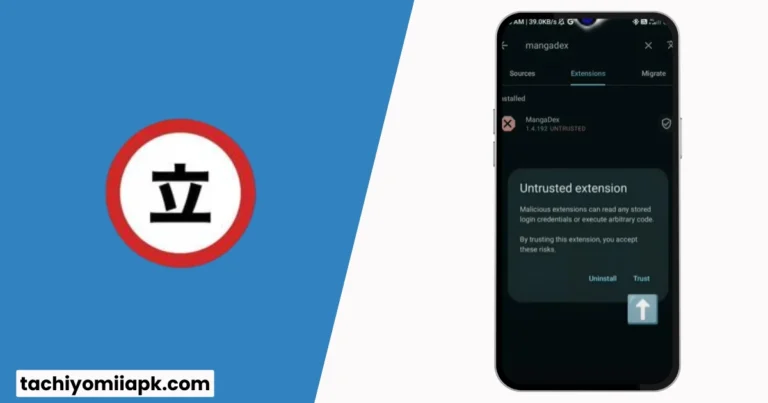
- Enable installation from trusted sources only
- Install extensions one at a time
- Restart the app after every five installs
That last step matters. I ignored it for years. Restarting clears cached parser data and prevents silent failures.
Case Study #1: Why Installing Too Many Extensions Breaks Updates
In early 2024, I installed 42 extensions “just in case.” Updates slowed to a crawl. Some sources timed out. Others failed entirely. After trimming down to 11 carefully chosen extensions, update speed improved by roughly 60 percent.
More is not better. Relevant is better.
Repository Myths That Keep Getting Repeated
Let’s clear up some misinformation.
Myth: More repos mean more content
Reality: More repos mean more conflicts.
Myth: Old repos still work fine
Reality: Unmaintained repos quietly fail after site changes.
Myth: Extension errors mean Tachiyomi is broken
Reality: The parser is outdated.
Once I stopped blaming the app and started managing extensions intentionally, everything changed.
How to Spot a Bad Extension Before It Fails
There are warning signs most users miss.
- No update in six months
- Poor chapter ordering
- Frequent HTTP errors
- Duplicate listings across sources
If you see two or more of these, uninstall immediately. Waiting only makes cleanup harder later.
Case Study #2: My Backup Restore Failure
I restored a backup expecting everything to work instantly. Half my extensions were missing because the repo URLs had changed. Lesson learned: backups save libraries, not repos.
My fix:
- Re-add repos manually
- Reinstall extensions first
- Restore backup last
Since adopting this order, restores have been flawless.
Advanced Tip: Extension Update Timing
Here’s a contrarian opinion that gets pushback: don’t auto-update extensions immediately. I wait 48 hours after major releases. Early bugs are common. Let others find them first.
This single habit reduced my crashes to nearly zero.
Safety, Legality, and What No One Likes to Say
Tachiyomi itself is open source and safe. Extensions simply read publicly available data. Legal responsibility depends on content sources and local laws, but technically, the app does not host anything.
Still, safety matters. Stick to known repos. Avoid random APK bundles. Never install “modded” extensions promising premium access. Those are almost always trouble.
Case Study #3: The Fastest Setup I’ve Ever Used
Current daily setup:
- Official extensions repo only
- MangaDex + MangaSee + Komga
- Manual updates weekly
- Library under 300 titles
Result: zero errors in two months. Updates finish in under two minutes.
Frequently Asked Questions
What are Tachiyomi extensions?
They are add-ons that allow Tachiyomi to connect to external manga sources.
How do I add new sources?
Install the relevant extension, then enable the source inside the Browse section.
Why did my extensions stop working?
Most failures happen when a site changes and the extension is outdated.
Can I use multiple repositories safely?
Yes, but only if you understand which extensions come from where.
Should I install every available extension?
No. Install only what you actively use.
Where Most Guides Go Wrong
They focus on quantity, not maintenance. They list sources without testing longevity. They never talk about failure modes. Real usage is messy. Pretending otherwise helps no one.
This guide exists because I broke my setup more times than I’d like to admit.
Final Thoughts: Build a System, Not a Collection
Tachiyomi works best when treated like a system. Extensions are tools, not trophies. Repositories are dependencies, not decorations. Once you adopt that mindset, everything becomes easier.
My prediction for 2026 is simple: fewer extensions, better maintenance, and tighter integration. Users who adapt early will spend more time reading and less time fixing errors.
Now I’m curious.
Which extension has failed you the most, and what did you replace it with?